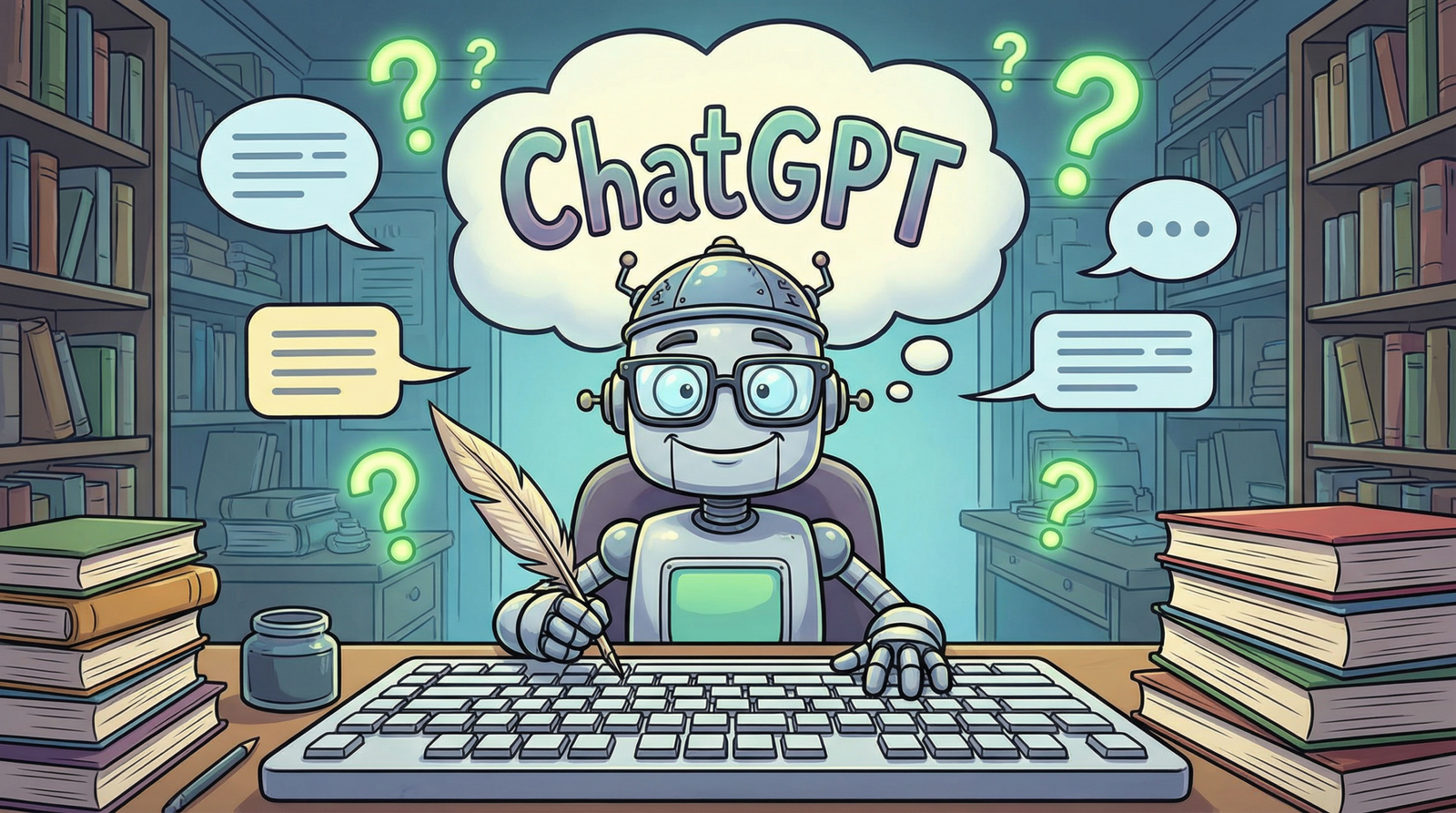
Kya aapne bhi Instagram, Twitter aur WhatsApp par logon ki funny 3D cartoon wali photos dekhi hain? Jismein koi Doctor ban kar baitha hai, koi Engineer, koi Teacher, aur koi CA — sab apni job ke hisaab se AI Caricature bana rahe hain?
Ye hai 2026 ka sabse viral trend — ChatGPT AI Caricature Photo Trend!
Aur sabse acchi baat? Isko banane ke liye kisi app ki zaroorat nahi hai। Bas ChatGPT open karo, ek prompt paste karo, apni photo upload karo — aur done! 🎯
AI Caricature Photo Kya Hoti Hai? 🤔
AI Caricature ek aisi cartoon-style 3D photo hoti hai jismein aapka chehra funny aur exaggerated dikhta hai — lekin pehchaana ja sakta hai।
Jaise aise samjho:
| Normal Photo | AI Caricature Photo |
|---|---|
| Aapka asli chehra | Bada sir, chhota body, funny expressions |
| Simple background | Job-related setup (hospital, office, classroom) |
| Boring look | Professional + Comedy ka mix |
Example: Agar aap ek Doctor hain toh aapki caricature mein aap ek chhote se body ke saath stethoscope pehenke, bade bade eyes ke saath dikhai doge — funny lekin professional! 😄
ChatGPT se AI Caricature Photo Kaise Banayein? (Step-by-Step Guide) 📱
Step 1: ChatGPT Open Karein
- Apne phone ya laptop par chat.openai.com open karein
- Login karein (Gmail se free mein sign up ho jaata hai)
- ChatGPT 4o ya ChatGPT 4 select karein (Free version mein bhi kaam kar raha hai)
⚠️ Important: Ye feature ChatGPT 4o model mein sabse accha kaam karta hai। Free users ko bhi limited access mil raha hai।
Step 2: Apni Ek Clear Photo Upload Karein
- Selfie ya passport-size photo best hoti hai
- Face clearly visible hona chahiye
- Background zyada matter nahi karta
- Acchi lighting wali photo dein
Pro Tip: Agar aap apni job ki uniform ya professional dress mein photo dete hain, toh result aur bhi accurate aata hai। 👔
Step 3: Ye Prompt Copy-Paste Karein ✍️
Yahan par aata hai sabse important step — THE PROMPT!
4. 📋 Best Copy-Paste Prompt (Job & Career Version)
🌟 MAIN PROMPT (Universal – Har Job ke liye kaam karega):
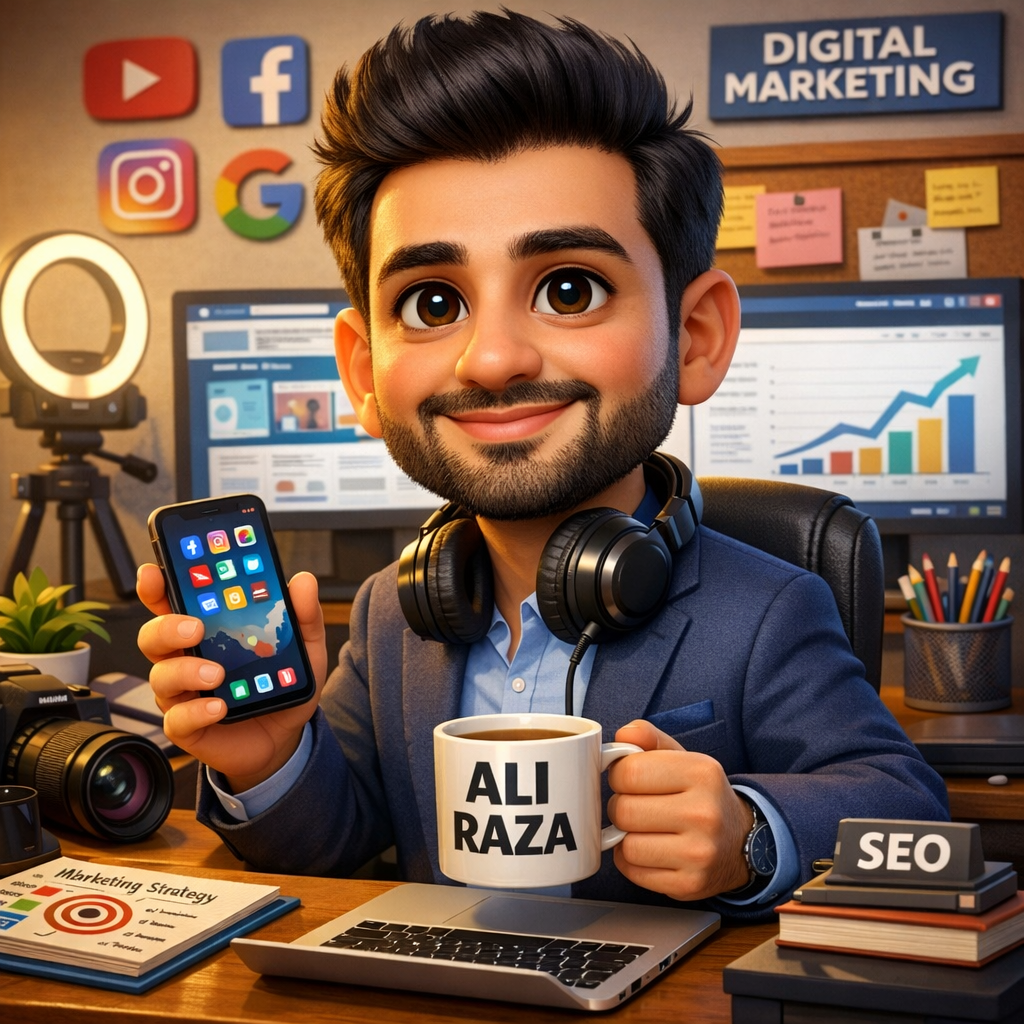
Create a high-quality, hyper-realistic 3D caricature illustration based on the uploaded photo of me. The style should be similar to Pixar/Disney 3D animation with slightly exaggerated facial features (big expressive eyes, a warm friendly smile, and a slightly oversized head compared to the body). My Job/Profession: [YAHAN APNI JOB LIKHEIN] Scene Setup: – I should be sitting/standing at my workplace – Wearing professional attire related to my job – Holding/using tools or props related to my profession – A coffee mug with “[APNA NAAM]” written on it should be visible – My desk/workspace should have items related to my job – The background should represent my work environment Art Style: – 3D rendered, smooth textures – Warm, soft lighting – Vibrant but professional color palette – Slightly cartoonish proportions (big head, expressive features) – High detail in facial features matching my uploaded photo The overall mood should be professional yet fun and approachable. The character should look confident and happy in their work environment.
🔧 Prompt Mein Kya Change Karna Hai?
Placeholder Kya Likhna Hai Example
[YAHAN APNI JOB LIKHEIN] Aapki actual job title Software Engineer
[APNA NAAM] Aapka naam Rahul
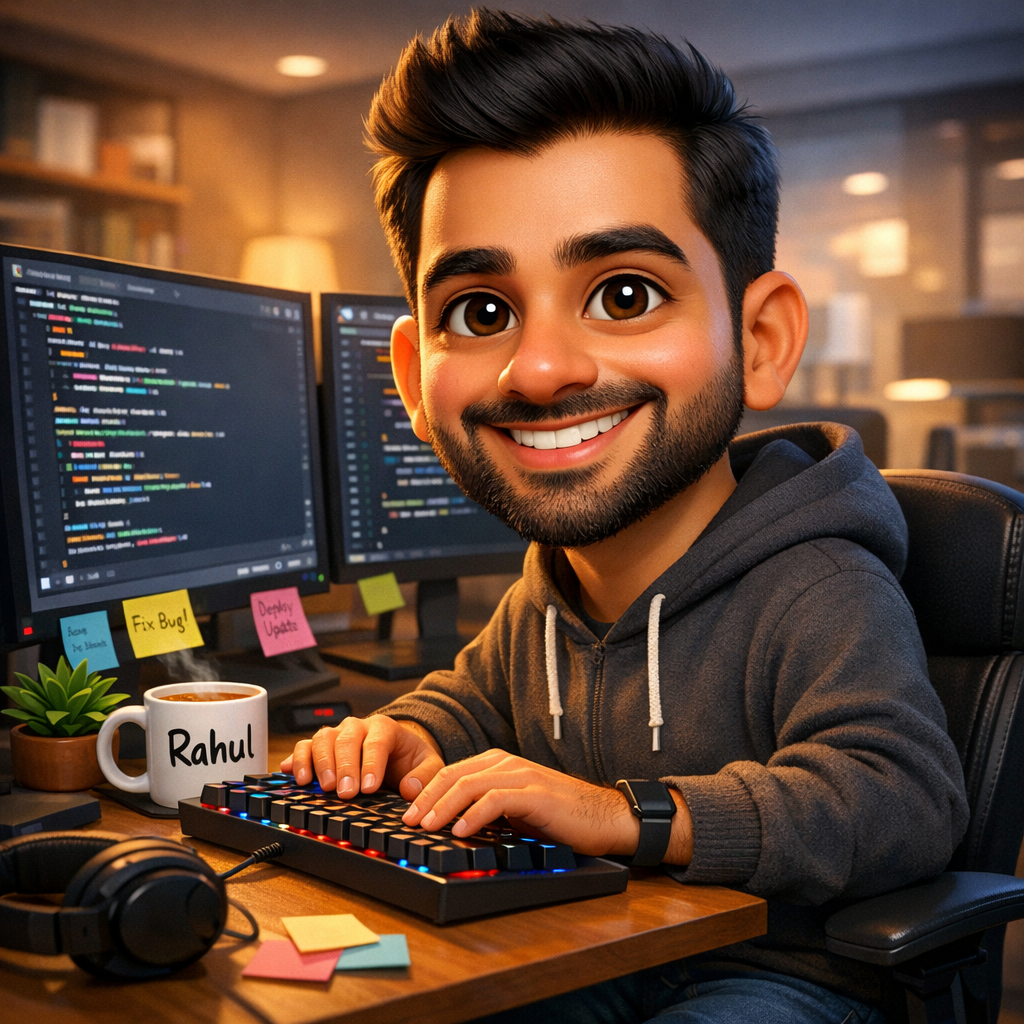
Create a high-quality, hyper-realistic 3D caricature illustration based on the uploaded photo of me. The style should be similar to Pixar/Disney 3D animation with slightly exaggerated facial features (big expressive eyes, a warm friendly smile, and a slightly oversized head compared to the body). My Job/Profession: Software Engineer Scene Setup: – I should be sitting at my desk with dual monitors showing code – Wearing a casual hoodie (typical developer style) – Typing on a mechanical keyboard – A coffee mug with “Rahul” written on it should be visible – My desk should have sticky notes, a small plant, and headphones – The background should be a modern tech office with warm lighting Art Style: – 3D rendered, smooth textures – Warm, soft lighting – Vibrant but professional color palette – Slightly cartoonish proportions (big head, expressive features) – High detail in facial features matching my uploaded photo The overall mood should be professional yet fun and approachable. The character should look confident and happy in their work environment.
Step 5: Enter Dabayein Aur Wait Karein
- Prompt paste karne ke baad Enter/Send button dabayein
- ChatGPT ko image generate karne mein 30 seconds se 2 minute lag sakte hain
- Ek high-quality 3D caricature aapke saamne aa jaayegi!
Step 6: Image Download Karein
- Generated image par click karein
- Download button (⬇️) par click karein
- Image aapke phone/computer mein save ho jaayegi
5. 💼 20+ Jobs ke Liye Ready-Made Prompts
👨💻 Prompt #1: Software Engineer / Developer
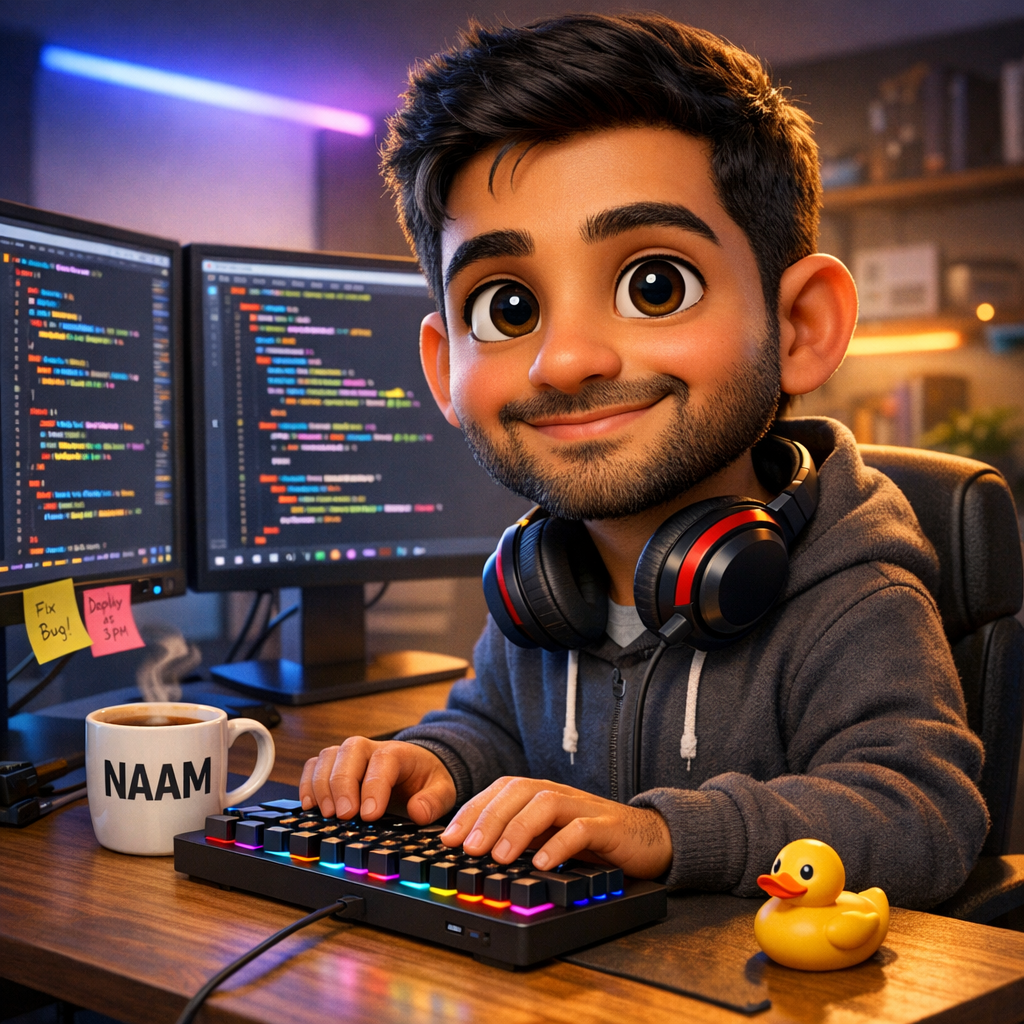
Create a 3D Pixar-style caricature of me as a Software Engineer. I’m sitting at a desk with dual monitors showing colorful code. I’m wearing a casual hoodie, typing on a mechanical keyboard. A coffee mug with my name “[NAAM]” is on the desk. Background: modern tech office with RGB lights. Props: headphones around neck, sticky notes on monitor, small rubber duck on desk. Style: hyper-realistic 3D, warm lighting, big expressive eyes, slightly oversized head, fun yet professional mood.
👩⚕️ Prompt #2: Doctor
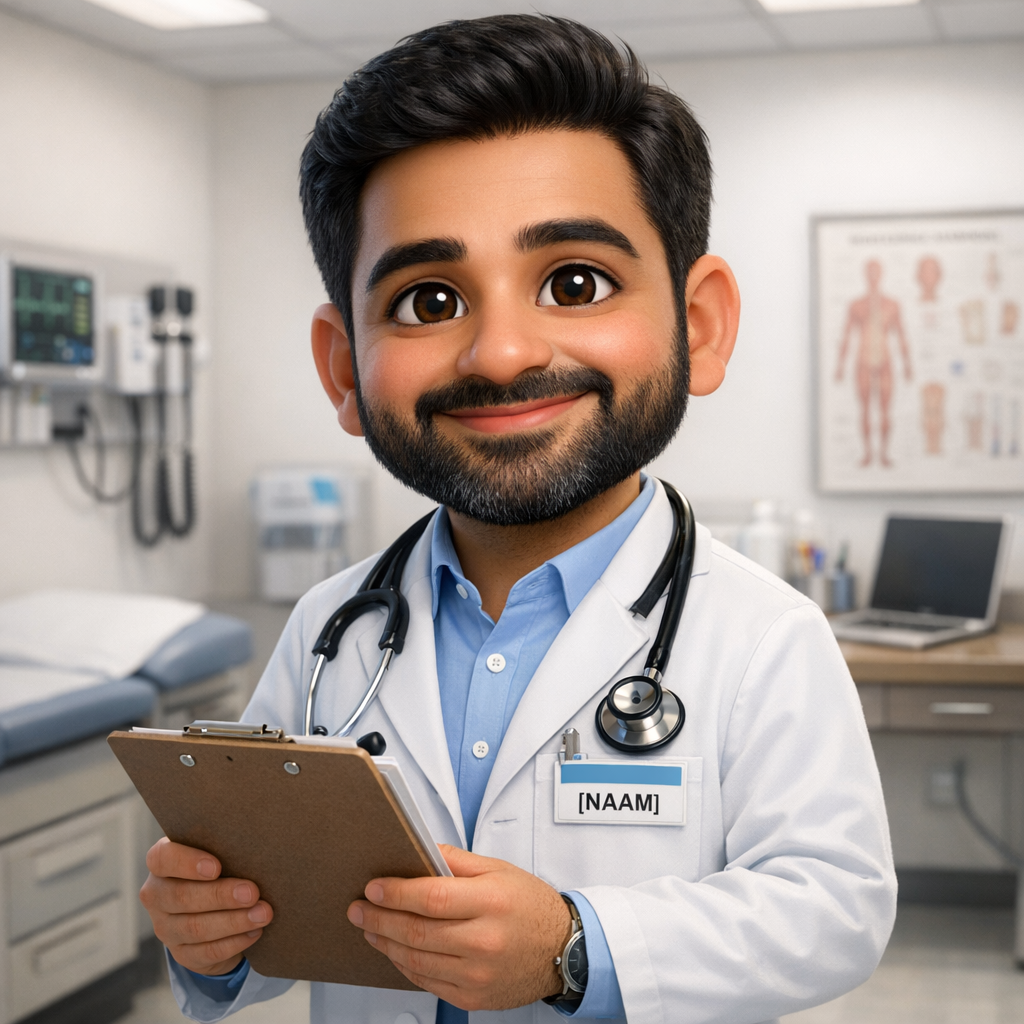
Create a 3D Pixar-style caricature of me as a Doctor. I'm standing in a clean, modern clinic wearing a white lab coat with a stethoscope around my neck. I'm holding a clipboard and smiling warmly. A name badge with "[NAAM]" is pinned on my coat. Background: hospital/clinic with medical equipment. Props: stethoscope, medical chart, small desk with laptop. Style: hyper-realistic 3D, soft white lighting, big kind eyes, slightly oversized head, trustworthy and caring mood.👨🏫 Prompt #3: Teacher / Professor
Create a 3D Pixar-style caricature of me as a Teacher. I'm standing in front of a green chalkboard with mathematical equations written on it. I'm holding a chalk in one hand and a book in another. Wearing formal clothes with glasses. A coffee mug with "[NAAM]" is on the teacher's desk. Background: colorful classroom with students' artwork on walls. Props: globe, stack of books, apple on desk. Style: hyper-realistic 3D, warm classroom lighting, wise and friendly expression, slightly oversized head.👩💼 Prompt #4: Business Owner / Entrepreneur
Create a 3D Pixar-style caricature of me as a successful Entrepreneur. I'm sitting in a luxurious office chair behind a mahogany desk. Wearing a sharp business suit with confidence. A nameplate with "[NAAM] - CEO" is on the desk. Background: corner office with city skyline view through glass windows. Props: laptop, business newspaper, coffee mug, small trophy. Style: hyper-realistic 3D, golden hour lighting, confident smile, power pose, slightly oversized head, ambitious mood.👨🍳 Prompt #5: Chef / Cook
Create a 3D Pixar-style caricature of me as a Professional Chef. I'm standing in a modern kitchen wearing a white chef's coat and tall chef's hat. I'm holding a frying pan with flames coming out of it (dramatic effect). An apron with "[NAAM]'s Kitchen" is visible. Background: professional restaurant kitchen with hanging pots. Props: spices, vegetables, cooking utensils. Style: hyper-realistic 3D, warm kitchen lighting, passionate expression, slightly oversized head, energetic mood.📊 Prompt #6: CA (Chartered Accountant)
Create a 3D Pixar-style caricature of me as a Chartered Accountant. I'm sitting at a desk completely surrounded by tall stacks of files and papers. Wearing formal office attire with glasses. I'm holding a calculator in one hand and looking overwhelmed but smiling. A coffee mug with "[NAAM] - CA" is visible. Background: office with filing cabinets. Props: calculator, tax files, laptop showing spreadsheets, pen behind ear. Style: hyper-realistic 3D, office fluorescent lighting mixed with desk lamp, funny stressed expression, slightly oversized head.🎨 Prompt #7: Graphic Designer
Create a 3D Pixar-style caricature of me as a Graphic Designer. I'm sitting at a creative desk with a large drawing tablet/iPad, using a stylus. Wearing trendy casual clothes. Background: creative studio with colorful artwork on walls, mood boards, and design inspiration. A coffee mug with "[NAAM]" written in a creative font. Props: Pantone color swatches, sketchbook, MacBook, designer toys (Funko Pop). Style: hyper-realistic 3D, colorful vibrant lighting, creative and fun expression, slightly oversized head.📸 Prompt #8: Photographer / Videographer
Create a 3D Pixar-style caricature of me as a Professional Photographer. I'm holding a large DSLR camera with a big lens, looking through the viewfinder. Wearing casual street-style clothes with a camera bag. Background: outdoor scenic location or studio with lighting equipment. A camera strap with "[NAAM] Photography" is visible. Props: tripod, memory cards, extra lenses, laptop for editing. Style: hyper-realistic 3D, dramatic lighting, focused passionate expression, slightly oversized head, artistic mood.👮 Prompt #9: Police Officer
Create a 3D Pixar-style caricature of me as a Police Officer. I'm standing tall in a crisp police uniform with badges and medals. One hand on my belt, standing with authority and a friendly smile. A name badge with "[NAAM]" is on the uniform. Background: police station or city street. Props: walkie-talkie, police cap, patrol car in background. Style: hyper-realistic 3D, strong lighting, brave and kind expression, slightly oversized head, heroic mood.✈️ Prompt #10: Pilot
Create a 3D Pixar-style caricature of me as an Airline Pilot. I'm standing in front of a large commercial airplane wearing a pilot's uniform with captain stripes, aviator sunglasses on head. Holding a pilot's bag. A name tag with "Captain [NAAM]" is visible. Background: airport tarmac with airplane. Props: pilot cap, flight manual, rolling suitcase. Style: hyper-realistic 3D, bright sky lighting, confident adventurous smile, slightly oversized head, prestigious mood.🏗️ Prompt #11: Civil Engineer
Create a 3D Pixar-style caricature of me as a Civil Engineer. I'm standing at a construction site wearing a yellow hard hat and safety vest over formal clothes. I'm holding a blueprint/construction plan and pointing at a building under construction. A hard hat with "[NAAM]" written on it. Background: construction site with cranes and buildings. Props: blueprint, measuring tape, safety helmet, clipboard. Style: hyper-realistic 3D, outdoor sunlight, determined and proud expression, slightly oversized head.💊 Prompt #12: Pharmacist
Create a 3D Pixar-style caricature of me as a Pharmacist. I'm standing behind a pharmacy counter wearing a white lab coat. I'm holding a medicine bottle and smiling helpfully. A name badge with "[NAAM] - Pharmacist" is visible. Background: modern pharmacy with organized medicine shelves. Props: prescription papers, mortar and pestle, medicine bottles, computer. Style: hyper-realistic 3D, clean bright lighting, helpful and knowledgeable expression, slightly oversized head, trustworthy mood.📰 Prompt #13: Journalist / News Reporter
Create a 3D Pixar-style caricature of me as a TV News Reporter. I'm standing with a microphone in hand, reporting live. Wearing professional formal attire. A microphone with "[NAAM] NEWS" branding is visible. Background: live news scene (could be outdoor or studio with screens). Props: microphone, press ID card, notepad, cameraman in background. Style: hyper-realistic 3D, broadcast lighting, confident and serious yet approachable expression, slightly oversized head.🎵 Prompt #14: Musician / Singer
Create a 3D Pixar-style caricature of me as a Professional Musician. I'm on stage holding a guitar/microphone (choose one) with stage lights creating a dramatic effect. Wearing stylish performance attire. Background: concert stage with colorful lights and crowd silhouette. Props: musical instrument, stage monitor, water bottle with "[NAAM]" label. Style: hyper-realistic 3D, dramatic concert lighting (purple, blue, pink), passionate and energetic expression, slightly oversized head, rockstar mood.🧑🌾 Prompt #15: Farmer (Kisan)
Create a 3D Pixar-style caricature of me as a Proud Indian Farmer. I'm standing in a lush green field wearing traditional farmer clothes (kurta, dhoti/jeans) with a pagdi/hat. I'm holding wheat/crop stalks proudly. Background: beautiful green farmland with sunrise. Props: tractor in background, crops, traditional farming tools, a board with "[NAAM] Farm" written. Style: hyper-realistic 3D, golden sunrise lighting, proud and happy expression, slightly oversized head, hardworking mood.⚖️ Prompt #16: Lawyer / Advocate
Create a 3D Pixar-style caricature of me as a Lawyer. I'm standing in a courtroom wearing a black advocate's coat with white bands. Holding a thick law book and looking confident. A nameplate with "Adv. [NAAM]" is visible on the desk. Background: Indian courtroom with wooden interiors. Props: gavel, law books stack, legal documents, glasses. Style: hyper-realistic 3D, courtroom dramatic lighting, intelligent and authoritative expression, slightly oversized head, justice mood.🏦 Prompt #17: Banker
Create a 3D Pixar-style caricature of me as a Bank Manager. I'm sitting at an official desk in a bank wearing formal business attire. I'm reviewing documents with a professional smile. A nameplate with "[NAAM] - Manager" is on the desk. Background: bank interior with counters and vault. Props: cash counting machine, files, computer, pen stand, bank logo. Style: hyper-realistic 3D, professional office lighting, trustworthy and efficient expression, slightly oversized head.🚗 Prompt #18: Cab Driver / Delivery Person
Create a 3D Pixar-style caricature of me as a Delivery Partner/Driver. I'm sitting on a bike/in a car wearing a delivery uniform with a big delivery bag on back. Smiling and holding up a phone showing a map. A delivery bag with "[NAAM] Delivers" written. Background: busy Indian city street. Props: smartphone with map, delivery bag, helmet, water bottle. Style: hyper-realistic 3D, city daylight, cheerful and hardworking expression, slightly oversized head, hustler mood.🎮 Prompt #19: Gamer / Content Creator
Create a 3D Pixar-style caricature of me as a Professional Gamer/Streamer. I'm sitting at a gaming setup with RGB lights, dual monitors showing a game. Wearing gaming headset and casual gamer clothes. A gaming chair with "[NAAM]" embroidered. Background: gaming room with LED strips, posters, figurines. Props: gaming keyboard, mouse, energy drink, webcam, streaming setup. Style: hyper-realistic 3D, RGB neon lighting, excited and focused expression, slightly oversized head, epic gamer mood.🏋️ Prompt #20: Gym Trainer / Fitness Coach
Create a 3D Pixar-style caricature of me as a Fitness Trainer. I'm standing in a gym wearing athletic wear, holding dumbbells, flexing muscles with a motivational expression. A gym towel with "[NAAM] FITNESS" is around my neck. Background: modern gym with equipment. Props: dumbbells, protein shake, stopwatch, training clipboard. Style: hyper-realistic 3D, dramatic gym lighting, strong and motivational expression, slightly oversized head and muscles (extra exaggerated for fun), energetic mood.6. 📸 Photo Upload Karne ka Sahi Tarika – Detailed Guide
📱 Mobile Se Upload Karne Ka Process:
Step 1: ChatGPT App open karein
Step 2: Neeche chat bar mein “+” ya 📎 icon dikhega, uspar tap karein
Step 3: Options aayenge:
- Camera – Abhi photo kheechain
- Photo Library – Gallery se select karein
Step 4: Photo Library select karein
Step 5: Apni best clear photo choose karein
Step 6: Photo select hone ke baad, prompt type karein ya paste karein
Step 7: Send button dabayein
💻 Desktop/Laptop Se Upload Karne Ka Process:
Step 1: Browser mein chat.openai.com open karein
Step 2: Chat bar mein paperclip icon (📎) par click karein
Step 3: Computer se photo browse karein aur select karein
Step 4: Photo attach hone ke baad prompt paste karein
Step 5: Enter dabayein
🖼️ Best Photo Specifications:
| Parameter | Recommended |
|---|---|
| Format | JPG, PNG |
| Resolution | Minimum 1080×1080 pixels |
| File Size | 2MB – 10MB ideal |
| Face Visibility | 100% clear, no obstruction |
| Lighting | Natural daylight best |
| Background | Clean/simple preferred |
| Expression | Smile with teeth visible = best result |
7. 🎯 Result Ko Better Kaise Banayein – Pro Tips
Tip #1: Regenerate Karein
Agar pehli image pasand nahi aayi, to ChatGPT mein likhein:
This is good but please make the following changes:
- Make my face more accurate to the photo
- Add more detail to the background
- Make the lighting warmer
- Make my smile bigger
Tip #2: Style Specify Karein
Agar koi specific style chahiye to ye add karein prompt mein:
Art style reference: Similar to Pixar's "Inside Out" character designYa:
Art style reference: Similar to Nintendo's Mii characters but more detailedTip #3: Multiple Angles Maangein
Now create the same caricature from a different angle - show me from the side profile while workingTip #4: Background Change Karein
Keep the same caricature of me but change the background to [new background description]Tip #5: Couple/Group Caricature Banayein
textNow add another person next to me. Here is their photo. They are a [Job Title]. Create both of us in our respective work environments side by side, in the same 3D Pixar caricature style.Tip #6: Social Media ke Hisaab se Size Maangein
Instagram Post ke liye:
Please create this image in 1:1 square ratio (1080x1080 pixels)Instagram Story/WhatsApp Status ke liye:
Please create this image in 9:16 vertical ratio (1080x1920 pixels)LinkedIn Banner ke liye:
Please create this image in 4:1 horizontal banner ratio (1584x396 pixels)Facebook Cover ke liye:
Please create this image in 820x312 pixel ratio for Facebook cover8. ⚠️ Privacy Risk Warning – Ye ZAROORI Padhein!
🚨 KHATARNAK BAAT JO KOI NAHI BATA RAHA!
Ye trend bahut maza ka hai, lekin iske saath kuch serious privacy risks bhi hain jo aapko jaanna zaroori hai:
Risk #1: Aapki Photo ChatGPT ke Paas Store Hoti Hai
Jab aap apni photo ChatGPT mein upload karte hain, to OpenAI company ke servers par woh photo store ho sakti hai. Unki privacy policy ke mutaabik, woh uploaded images ko AI model training ke liye use kar sakte hain.
Kya matlab? Aapka chehra future mein kisi AI training data mein use ho sakta hai – bina aapki permission ke!
Risk #2: Facial Recognition Data
Aapki photo se AI aapke facial features extract karta hai:
- ❌ Aapke chehre ki exact measurements
- ❌ Aapki skin tone data
- ❌ Aapke unique facial markers
- ❌ Aapke expressions ka pattern
Ye data agar leak hua to deepfake videos banaane ya identity theft mein use ho sakta hai.
Risk #3: Children’s Photos Ka Risk
Bahut se parents apne bachhon ki photos upload kar rahe hain caricature banwane ke liye. Ye sabse bada risk hai kyunki:
- Bachhon ki consent nahi hoti
- Unka facial data permanently store ho sakta hai
- Future mein kaise use hoga – pata nahi
🛡️ Apni Privacy Kaise Protect Karein?
Safety Measure #1: Settings Mein Data Training Band Karein
- ChatGPT open karein
- Settings mein jaayein
- Data Controls par click karein
- “Improve the model for everyone” option ko OFF karein
⚡ Ye karne se aapki uploaded photos AI training ke liye use nahi hongi.
Safety Measure #2: Chat Delete Karein
Caricature banane ke baad:
- Us chat ko delete kar dein
- Settings > Data Controls > Delete All Chats bhi use kar sakte hain
Safety Measure #3: Bachhon Ki Photos Upload Mat Karein
Children ki privacy sabse important hai. Unki photos AI tools mein upload karna avoid karein.
Safety Measure #4: Sensitive Photos Se Bachein
- Aadhaar Card wali photo
- Passport photo
- Official document photos
- Private/personal photos
📊 Experts Kya Keh Rahe Hain?
Cyber Security Expert Rajesh Kumar kehte hain: “AI tools mein apni photos upload karna risky hai. Log ye nahi samajhte ki unka facial data ek baar upload hone ke baad uska control unke haath mein nahi rehta.”
Digital Privacy Advocate Priya Sharma kehti hain: “Ye trend fun hai lekin log blindly apni aur apne bachhon ki photos upload kar rahe hain. Kam se kam settings mein data training toggle OFF zaroor karein.”
✅ Final Verdict:
| Action | Safety Level |
|---|---|
| Settings mein data training OFF karke use karna | 🟢 Relatively Safe |
| Bina settings change kiye use karna | 🟡 Risky |
| Bachhon ki photos upload karna | 🔴 Bahut Risky |
| Sensitive documents wali photos upload karna | 🔴 Bahut Risky |
9. 🛠️ AI Caricature Banane ke Alternative Tools
Agar aap ChatGPT ke alawa bhi try karna chahte hain, ye tools use kar sakte hain:
Tool #1: Microsoft Copilot (Free)
- Website: copilot.microsoft.com
- Quality: Bahut achhi
- Free: Haan
- Photo Upload: Available
Tool #2: Google Gemini
- Website: gemini.google.com
- Quality: Achhi (improving)
- Free: Haan
- Photo Upload: Available
Tool #3: Meta AI (WhatsApp)
- Platform: WhatsApp mein hi available
- Quality: Good
- Free: Haan
- Easy: Bahut aasaan
Tool #4: Midjourney
- Platform: Discord based
- Quality: Sabse best
- Free: Nahi (Paid – $10/month)
- Photo Upload: Available
Tool #5: Leonardo AI
- Website: leonardo.ai
- Quality: Bahut achhi
- Free: Limited (150 credits/day)
- Specialty: Artistic styles
Comparison Table:
| Tool | Free | Quality | Ease of Use | Photo Upload | Hindi Support |
|---|---|---|---|---|---|
| ChatGPT | Limited | ⭐⭐⭐⭐⭐ | Easy | ✅ | ✅ |
| Copilot | Yes | ⭐⭐⭐⭐ | Easy | ✅ | ✅ |
| Gemini | Yes | ⭐⭐⭐ | Easy | ✅ | ✅ |
| Meta AI | Yes | ⭐⭐⭐ | Very Easy | ✅ | ✅ |
| Midjourney | No | ⭐⭐⭐⭐⭐ | Medium | ✅ | ❌ |
| Leonardo | Limited | ⭐⭐⭐⭐ | Medium | ✅ | ❌ |
10. 🚀 Nayi Website ke Liye Traffic Strategy (Secret Method)
⚡ Ye section un logon ke liye hai jo is trend par article likhkar apni website par traffic laana chahte hain.
🎯 Strategy #1: Article Ka Title Aisa Rakhein (Clickbait + Value)
Hindi Titles (High CTR):
- ✅ “ChatGPT se apni Viral AI Caricature Photo kaise banayein? Ye raha Best Copy-Paste Prompt”
- ✅ “AI Caricature Trend 2026: Sirf 2 Minute mein banaao apni 3D Cartoon Photo – FREE!”
- ✅ “⚠️ ChatGPT mein Photo Upload karne se pehle ye jaanna zaroori hai! AI Caricature ki Poori Sachai”
- ✅ “20 Jobs ke Ready-Made AI Caricature Prompts – Sirf Copy-Paste Karo!”
- ✅ “Valentine Special: Couple AI Caricature Kaise Banayein? ChatGPT Prompt Inside”
🎯 Strategy #2: Article Mein Ye 5 Cheezein ZAROORI Rakhein
Element 1: The Prompt (Hero Content)
- Sabse pehle woh viral prompt dein
- Use code block mein likhein (copy karne mein aasaani ho)
- Multiple jobs ke prompts dein
Element 2: The Warning (Viral Hook)
- Privacy Risk ka angle likhein
- Ye isse article ki credibility badhata hai
- Log “Alert/Warning” content zyada share karte hain
- WhatsApp par forward hota hai
Element 3: Screenshots/Examples
- Apne khud ke AI caricature results dikhayein
- Before-After style mein
- Multiple jobs ke examples
Element 4: Step-by-Step Guide
- Bilkul beginner-friendly
- Numbered steps
- Screenshots ke saath
Element 5: FAQ Section
- Schema markup ke saath
- Google mein directly answer dikhta hai
- Voice search traffic aata hai
🎯 Strategy #3: Google Web Stories (SABSE POWERFUL TRICK)
Ye nayi websites ke liye GOLDMINE hai!
Google Web Stories se Google Discover mein feature hone ka chance milta hai. Ek Web Story se ek din mein 10,000 – 1,00,000 views aa sakte hain!
11. 📖 Google Web Stories Kaise Banayein – Step by Step
Web Story Kya Hai?
Google Web Story ek visual, swipeable content format hai – bilkul Instagram Stories jaisi, lekin Google ke platform par.
Web Story Banane ke Tools:
WordPress Users:
- Web Stories Plugin by Google (Free) – Sabse best
- Starter templates available hain
Non-WordPress Users:
- MakeStories.io (Free + Paid)
- Newsroom AI
AI Caricature Topic Par Web Story Ka Structure:
Slide 1 (Cover):
Title: “ChatGPT se AI Caricature Kaise Banayein?”
Background: Eye-catching AI caricature image
CTA: “Swipe to learn ➡️”
Slide 2:
“February 2026 ka Sabse Viral Trend!”
Image: Screenshots of viral AI caricatures on social media
Text: “Ye 3D cartoon photos har jagah viral ho rahi hain…”
Slide 3:
“Ye Hai ChatGPT ka Magic ✨”
Image: ChatGPT interface screenshot
Text: “Sirf ek prompt se banti hai aisi amazing photo”
Slide 4:
“Step 1: ChatGPT Open Karein”
Image: ChatGPT login page screenshot
Text: “chat.openai.com par jaayein aur login karein”
Slide 5:
“Step 2: Apni Photo Upload Karein”
Image: Photo upload process screenshot
Text: “Clear front-facing photo select karein”
Slide 6:
“Step 3: Ye Prompt Copy-Paste Karein”
Image: Prompt text ka screenshot
Text: “Full prompt hamare article mein hai – Link in last slide!”
Slide 7:
“⚠️ Lekin Ruko! Ye Jaanna Zaroori Hai…”
Image: Warning icon/privacy image
Text: “Aapki photo ka data ChatGPT store karta hai!”
Slide 8:
“Apni Privacy Kaise Protect Karein?”
Image: Settings screenshot
Text: “Settings > Data Controls > Training OFF karein”
Slide 9:
“20+ Jobs ke Ready-Made Prompts Chahiye?”
Image: Multiple caricature examples collage
Text: “Doctor, Engineer, Teacher, CA… Sabke prompts!”
Slide 10 (CTA Slide):
“Full Guide + All Prompts Yahan Padhein 👇”
Button: “READ FULL ARTICLE”
Link: Apne article ka URL
Web Story SEO Tips:
✅ Title mein focus keyword use karein
✅ Har slide ki image ka Alt Text likhein
✅ Poster Image (cover) bahut attractive honi chahiye
✅ Publisher Logo add karein
✅ Story 8-15 slides ki honi chahiye (zyada nahi)
✅ Har slide par kam text rakhein (mobile-friendly)
✅ Last slide par article ka link zaroor dein
✅ AMP valid honi chahiye (plugin automatically karta hai)
Web Story Se Traffic Kaise Aata Hai?
textWeb Story Publish → Google Index → Google Discover →
Millions of Phone Screens → Massive Traffic → Article par Click
Timeline:
- Publish karne ke 2-6 ghante mein Google index karta hai
- 12-48 ghante mein Discover mein dikhna shuru ho sakta hai
- Peak traffic 2-5 din tak rehta hai
- Trending topic par lakhs of views possible hain
12. ❓ FAQ – Aksar Poochhe Jaane Wale Sawaal
Q1: Kya ChatGPT se AI Caricature banana free hai?
Answer: ChatGPT ka free version mein limited image generation available hai. Aap din mein 2-3 images free bana sakte hain. Unlimited images ke liye ChatGPT Plus ($20/month) lena hoga. Lekin zyada tar logon ke liye free version kaafi hai – ek achhi caricature banane mein 1-2 attempts lagte hain.
Q2: Kya mujhe English mein hi prompt dena hoga?
Answer: Nahi! Aap Hindi mein bhi prompt de sakte hain. Lekin English mein prompt dene se results thode better aate hain kyunki AI model English data par zyada trained hai. Humne jo prompts diye hain woh English mein hain – aap unhe seedha copy-paste kar sakte hain.
Q3: Meri photo bilkul mere jaisi nahi ban rahi. Kya karoon?
Answer: Ye common issue hai. Ye solutions try karein:
- Better quality photo upload karein (HD, clear face)
- Prompt mein apne specific features mention karein (e.g., “I have a beard, I wear glasses, I have curly hair”)
- Regenerate karein – har baar thoda different result aata hai
- “Make the face more accurate to my uploaded photo” likh kar bhejein
Q4: Kya ye trend sirf ChatGPT mein kaam karta hai?
Answer: Nahi, ye Microsoft Copilot, Google Gemini, Meta AI aur kai aur tools mein bhi kaam karta hai. Lekin currently ChatGPT ki quality sabse best hai is type ke caricatures ke liye.
Q5: Kya main AI caricature ko commercial use ke liye use kar sakta hoon?
Answer: ChatGPT se generate ki gayi images ko aap commercial use kar sakte hain (OpenAI ki current policy ke mutaabik). Lekin ye policy change ho sakti hai, isliye latest terms of service zaroor check karein. Agar aap professional use ke liye banana chahte hain (business cards, marketing), to paid plan recommend hai.
Q6: Kya AI caricature se meri actual photo leak ho sakti hai?
Answer: Aapki exact original photo leak hone ke chances kam hain, lekin aapke facial data ko AI training mein use kiya ja sakta hai. Isliye humne upar Privacy section mein data training OFF karne ka tarika bataya hai – woh zaroor follow karein.
Q7: Couple caricature kaise banayein?
Answer: Dono logon ki alag-alag photos upload karein aur prompt mein likhein:
textCreate a 3D caricature of both people. Person 1 is a [Job] and Person 2 is a [Job]. Show them together in a fun scene.Q8: Kya main bina photo upload kiye caricature bana sakta hoon?
Answer: Haan! Aap bina photo ke bhi caricature bana sakte hain – lekin woh aapke jaisi nahi dikhegi. Woh ek generic character hogi. Apni jaisi dikhane ke liye photo upload karna zaroori hai.
Q9: Mobile se better results aate hain ya laptop se?
Answer: Results dono se same aate hain kyunki processing OpenAI ke servers par hoti hai. Lekin photo upload karne mein mobile se thoda easier hai (direct camera gallery se select). Desktop par prompt editing karna easier hai.
Q10: Ek din mein kitni caricatures bana sakte hain free mein?
Answer: February 2026 ke mutaabik, ChatGPT Free version mein approximately 2-3 image generations per day milti hain. Ye limit change ho sakti hai. ChatGPT Plus mein practically unlimited (fair use policy ke andar) images bana sakte hain.
13. 🎬 Conclusion
ChatGPT AI Caricature Trend February 2026 ka sabse viral aur fun trend hai. Is article mein humne aapko har ek detail cover ki:
✅ Kya hai ye trend aur kyun viral hai
✅ Step-by-step process – bilkul beginner-friendly
✅ 20+ Ready-made prompts – har job ke liye
✅ Photo upload karne ka sahi tarika
✅ Pro tips – result better banane ke liye
✅ Privacy warning – apni safety ke liye
✅ Alternative tools – ChatGPT ke alawa options
✅ Traffic strategy – website owners ke liye
🔥 Ab Aapki Baari!
- Is article ko bookmark karein (baad mein kaam aayega)
- Apni favourite job ka prompt copy karein
- ChatGPT open karein aur try karein
- Result WhatsApp/Instagram par share karein
- Friends ko bhi ye article share karein 🔗
📌 Quick Links:
Last Updated: February 2026
Author: Himanshu Yadav / TechpediaX.com
Category: Technology, AI Trends, How-To Guide
Tags: AI Caricature, ChatGPT, AI Photo Generator, 3D Caricature, AI Trend 2026, ChatGPT Prompt Hindi, Career Caricature, Job Photo AI